ELK Stack实用部署教程

Stitch-Zhang

Stitch-Zhang

An iddle programer

ELK Stack组件完整搭建及使其能分析内网DNS日志记录、Cicso日志...并将数据可视化于Kibana中

ELK8.0部署流程#

服务器列表#

服务器均满足以下条件

  • 新增用户elk用于软件的运行
  • 软件包放置于/soft目录
  • 数据文件放置于/data目录
  • 日志放置于/logs目录
  • 确保elk用户拥有以上目录的读写得权限
IP配置软件包用途
10.26.211.110VM,4C8Grsyslog
filebeat
接受并处理syslog日志
10.26.211.172VM,4C8Grsyslog
filebeat
接受并处理syslog日志
10.26.211.166VM,4C8Glogstash
redis
数据缓存处理
10.26.211.167VM,4C8Glogstash
redis
数据缓存处理
10.26.211.168VM,4C8Gelasticsearch存储、分析节点
10.26.211.169VM,4C8Gelasticsearch存储、分析节点
10.26.211.170VM,4C8Gelasticsearch存储、分析节点
10.26.211.171VM,4C8Gelasticsearch
kibana
nginx
ingest节点、内容展示平台
10.26.246.60Phys,16C128Gfilebeat
logstash
TCPDUMP采集DNS日志

Elasticsearch#

上传软件包#

使用WinSCP上传 软件包以下设备的/soft目录中

  • 10.26.211.168
  • 10.26.211.169
  • 10.26.211.170
  • 10.26.211.171

image-20220314100504161

解压缩软件包#

使用elk用户登录服务器

如果是root用户登录,可使用su - elk进行切换elk用户

切换至/soft目录

$ cd /soft

解压缩软件包

$ tar xvf

更改文件夹名称

$ mv elasticsearch-8.0.0/ elasticsearch8

配置#

配置JVM堆内存大小#

注意#

官方文档建议:

  • 生产环境中推荐使用默认配置
  • 配置请勿超过内存资源的50%

image-20220314102042172

配置最大为4G

$ vi /soft/elasticsearch8/config/jvm.options
# 新增如下
-Xms4g
-Xmx4g

配置Elasticsearch#

配置文件为yml请注意每个键值对中间存在空格

键:

vi /soft/elasticsearch8/config/elasticsearch.yml

集群名

cluster.name: dlog.dpca

节点名称

elasticsearch1 - elasticsearch4

node.name: elasticsearch1

数据目录

path.data: /data/elasticsearch8

日志目录

path.logs: /path/to/logs

配置IP

network.host: 10.26.211.168

配置端口

http.port: 9200

*配置角色 (10.26.211.171)

node.roles: ["ingest","remote_cluster_client"]

默认配置为如下角色

  • master
  • data
  • data_content
  • data_hot
  • data_warm
  • data_cold
  • data_frozen
  • ingest
  • ml
  • remote_cluster_client
  • transform

初始化集群#

可在数据节点服务器中选任意一个运行

如下将使用10.26.211.168

将会自自动配置安全功能,其中包括

  • 自签发证书于${elasticsearch_home}/config/certs目录
  • 启用xpack配置
  • 初始化elastic 用户并设置密码
  • 集群Token(enrollment token) 半小时有效
$ /soft/elasticsearch8/bin/elasticsearch

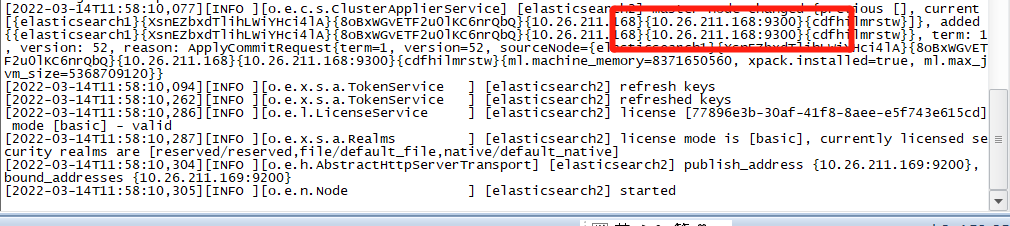
出现如下则表示集群初始化完成image-20220314135154892

加入集群#

对以下服务器进行加入集群操作

  • 10.26.211.169
  • 10.26.211.170
  • 10.26.211.171
$ ./elasticsearch --enrollment-token <token>

image-20220314132506877

image-20220314132417589

查询集群在线节点#

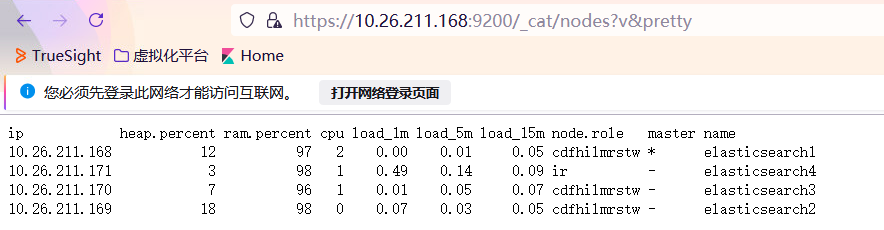
浏览器访问:https://10.26.211.168:9200/_cat/nodes?v&pretty

访问需要提供elastic账户和密码

image-20220314134824031

密码为步骤时生成的

四个节点均在线

image-20220314134318182

脚本启动#

通过ssh连接服务器上启动的进程,其父进程为sshd ,当会话断开连接时,启动的进程将会被关闭
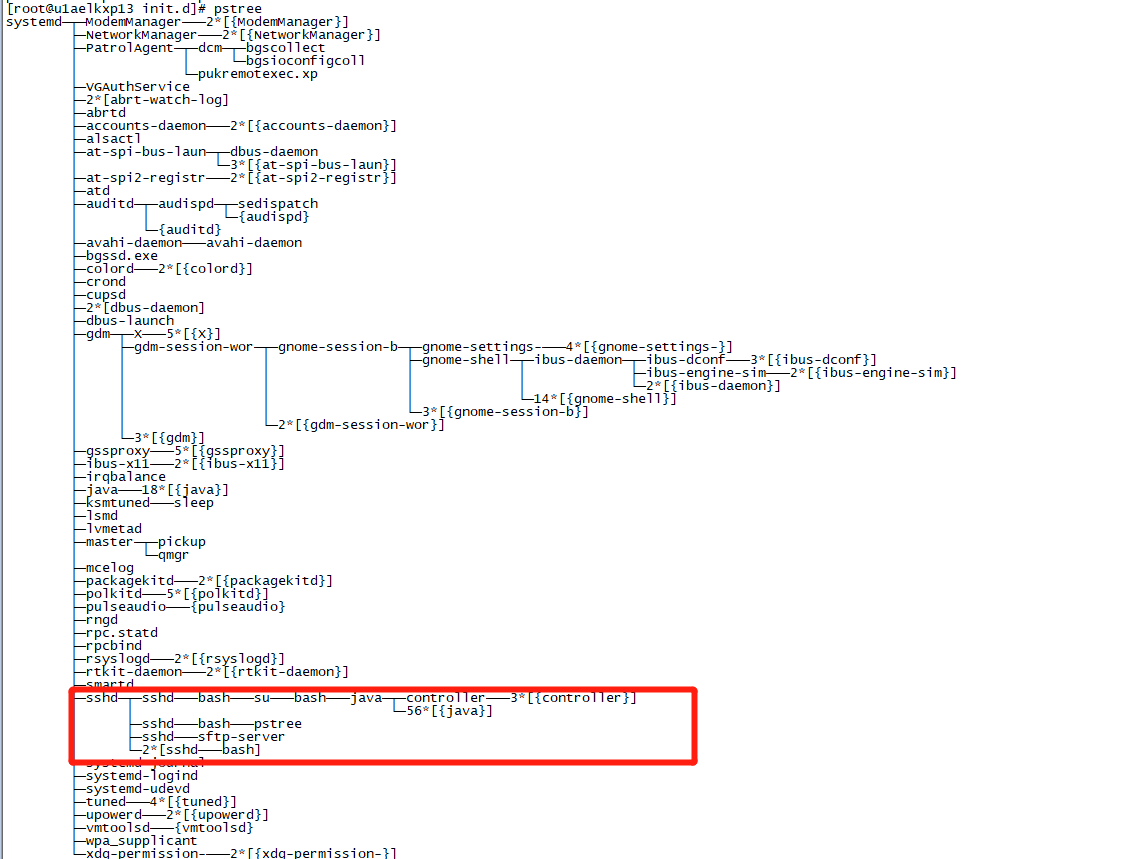
image-20220314143351144

为了长久运行,通常采用配置服务文件通过systemctl启动或旧版service启动

通过service管理#

放置于/etc/init.d

vi /etc/init.d/elasticsearch

#!/bin/bash
# chkconfig: 2345 10 90
# description: elasticsearch start stop status restart
# return code:
# 101:running
# 102:stopped
# 103:startup timeout
# 104:shutdown timeout
# elasticsearch home directory
ELASTIC_HOME=/soft/elasticsearch8
status() {
pid=`ps -ef | grep java | grep elasticsearch | grep -v grep | awk '{print $2}'`
if [ -n "$pid" ];then
echo "elasticsearch is running(pid:$pid)..."
status_code=101
else
echo "elasticsearch is not running."
status_code=102
fi
}
start() {
status > /dev/null 2>&1
if [ $status_code -eq 101 ];then
echo "elasticsearch is running(pid:$pid),don't have to start again."
elif [ $status_code -eq 102 ];then
echo "elasticsearch starting..."
su - elk -c "$ELASTIC_HOME/bin/elasticsearch -d" > /dev/null 2>&1
count=0
until [ $status_code -eq 101 ] || [ $count -gt 15 ];do
sleep 3
let count=$count+3
status > /dev/null 2>&1
done
if [ $status_code -eq 101 ];then
echo "elasticsearch started."
elif [ $count -gt 15 ];then
echo "elasticsearch failed to start."
status_code=103
fi
fi
}
stop() {
status > /dev/null 2>&1
if [ $status_code -eq 102 ];then
echo "elasticsearch is not running,don't have to stop again."
elif [ $status_code -eq 101 ];then
echo "elasticsearch stopping..."
kill -9 $pid
count=0
until [ $status_code -eq 102 ] || [ $count -gt 15 ];do
sleep 3
let count=$count+3
status > /dev/null 2>&1
done
if [ $status_code -eq 102 ];then
echo "elasticsearch stopped."
elif [ $count -gt 15 ];then
echo "elasticsearch failed to stop."
status_code=104
fi
fi
}
restart() {
stop
start
}
case $1 in
status)
status
;;
start)
start
;;
stop)
stop
;;
restart)
stop
start
;;
*)
echo "Usage: $0 {start|stop|status|restart}"
esac

需要使用root用户启动/停止

启动#
# service elasticsearch start
关闭#
# service elasticsearch stop
状态#
# service elasticsearch status
重启#
# service elasticsearch restart

Kibana#

将会使用本机10.26.211.171作为集群接入点

上传软件包#

上传 kibana-8.0.0-linux-x86_64.tar.gz10.26.211.171/soft目录

解压缩#

使用elk用户进行操作

$ cd /soft
$ tar xvf kibana-8.0.0-linux-x86_64.tar.gz
$ mv kibana-8.0.0 kibana8

配置启、停、状、重#

基础配置#

绑定本地IP

server.host: "10.26.211.171"

配置中文

i18n.locale: "zh-CN"

绑定端口

server.port: 5601

配置日志输出

logging.appenders.default:
type: file
fileName: /logs/kibana8/kibana.log
layout:
type: json

需要创建日志目录,否则报错

mkdir /logs/kibana8

网页配置#
运行#

$ cd /soft/kibana8/bin
$ ./kibana

image-20220314170209142

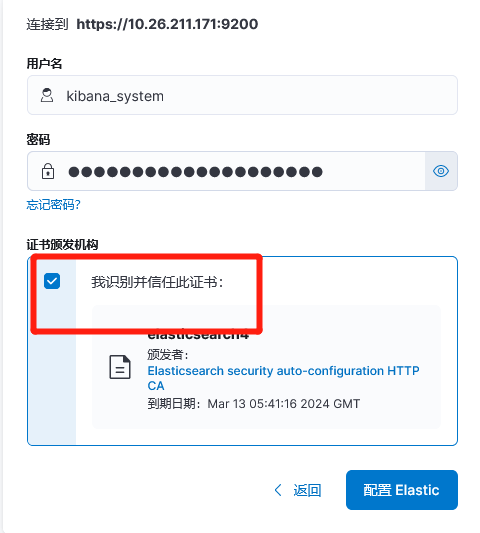
浏览器打开http://10.26.211.171:5601/?code=996654进行网页配置

image-20220314170552173

重置kibana_system密码#
$ ./elasticsearch-reset-password -u kibana_system

image-20220314171100801

脚本启动#

# vi /etc/init.d/kibana
#!/bin/bash
# chkconfig: 2345 10 90
# description: kibana start stop status restart
# return code:
# 101:running
# 102:stopped
# 103:startup timeout
# 104:shutdown timeout
# kibana home目录
KIBANA_HOME=/soft/kibana8
status() {
pid=`ps -ef | grep kibana | grep cli | grep -v grep | awk '{print $2}'`
if [ -n "$pid" ];then
echo "kibana is running(pid:$pid)..."
status_code=101
else
echo "kibana is not running."
status_code=102
fi
}
start() {
status > /dev/null 2>&1
if [ $status_code -eq 101 ];then
echo "kibana is running(pid:$pid),don't have to start again."
elif [ $status_code -eq 102 ];then
echo "kibana starting..."
su - elk -c "$KIBANA_HOME/bin/kibana &" >> /logs/kibana/kibana.log 2>&1
count=0
until [ $status_code -eq 101 ] || [ $count -gt 15 ];do
sleep 3
let count=$count+3
status > /dev/null 2>&1
done
if [ $status_code -eq 101 ];then
echo "kibana started."
elif [ $count -gt 15 ];then
echo "kibana failed to start."
status_code=103
fi
fi
}
stop() {
status > /dev/null 2>&1
if [ $status_code -eq 102 ];then
echo "kibana is not running,don't have to stop again."
elif [ $status_code -eq 101 ];then
echo "kibana stopping..."
kill -9 $pid
count=0
until [ $status_code -eq 102 ] || [ $count -gt 15 ];do
sleep 3
let count=$count+3
status > /dev/null 2>&1
done
if [ $status_code -eq 102 ];then
echo "kibana stopped."
elif [ $count -gt 15 ];then
echo "kibana failed to stop."
status_code=104
fi
fi
}
restart() {
stop
start
}
case $1 in
status)
status
;;
start)
start
;;
stop)
stop
;;
restart)
stop
start
;;
*)
echo "Usage: $0 {start|stop|status|restart}"
esac

启、停、状、重#

# service kibana {start|stop|status|restart}

DNS日志集成#

服务器:10.26.246.60

日志文件位于:/logs/dnsqtime/

单条日志形如

{"msgid":"{-}","structured-data":"{-}","app-name":"{root}","syslogseverity":"{5}","programname":"{root}","syslogtag":"{root:}","log_info":"{ 10.26.211.80.36217 > 10.26.219.5.53: [udp sum ok] 51248+ A? u1apscxp01.prd.dpca. (37)}","fromhost":"u1adnsap01","fromhost-ip":"127.0.0.1","facility":"user","priority":"notice","timereported":"2022-03-06T23:59:59.997769+08:00","timegenerated":"2022-03-06T23:59:59.997769+08:00"}

日志生成到日志发送到Elasticsearch流程

TCPDUMP -> logger -> Filebeat -> Logstash -> Elasticsearch

部署FileBeat & Logstash#

上传软件#

image-20220315102524597

解压缩#

$ tar xvf logstash-8.0.0-linux-x86_64.tar.gz
$ tar xvf filebeat-8.0.0-linux-x86_64.tar.gz

重命名#

$ mv filebeat-8.0.0-linux-x86_64 filebeat8
$ mv logstash-8.0.0 logstash8

FileBeat#

Input -> Filter -> Output

配置#
$ vi /soft/filebeat8/filebeat.yml
DNS日志输入文件流#
filebeat.inputs:
- type: filestream
paths:
- /logs/dnsq/*
fields:
doctype: json_syslog
logindex: dnsqtime
Filebeat程序日志#
logging.level: info
logging.to_files: true
logging.files:
path: /logs/filebeat
name: filebeat
keepfiles: 7
permissions: 0644
启用模块#
filebeat.config.modules:
path: ${path.config}/modules.d/*.yml
reload.enabled: false
预处理#
processors:
- drop_fields:
fields: ["input_type","offset"]
将数据输出到本地Logstash#
output.logstash:
hosts: ["127.0.0.1:5044"]
配置Kibana端点#
setup.kibana.host: "https://10.26.211.171:5601"
Xpack#

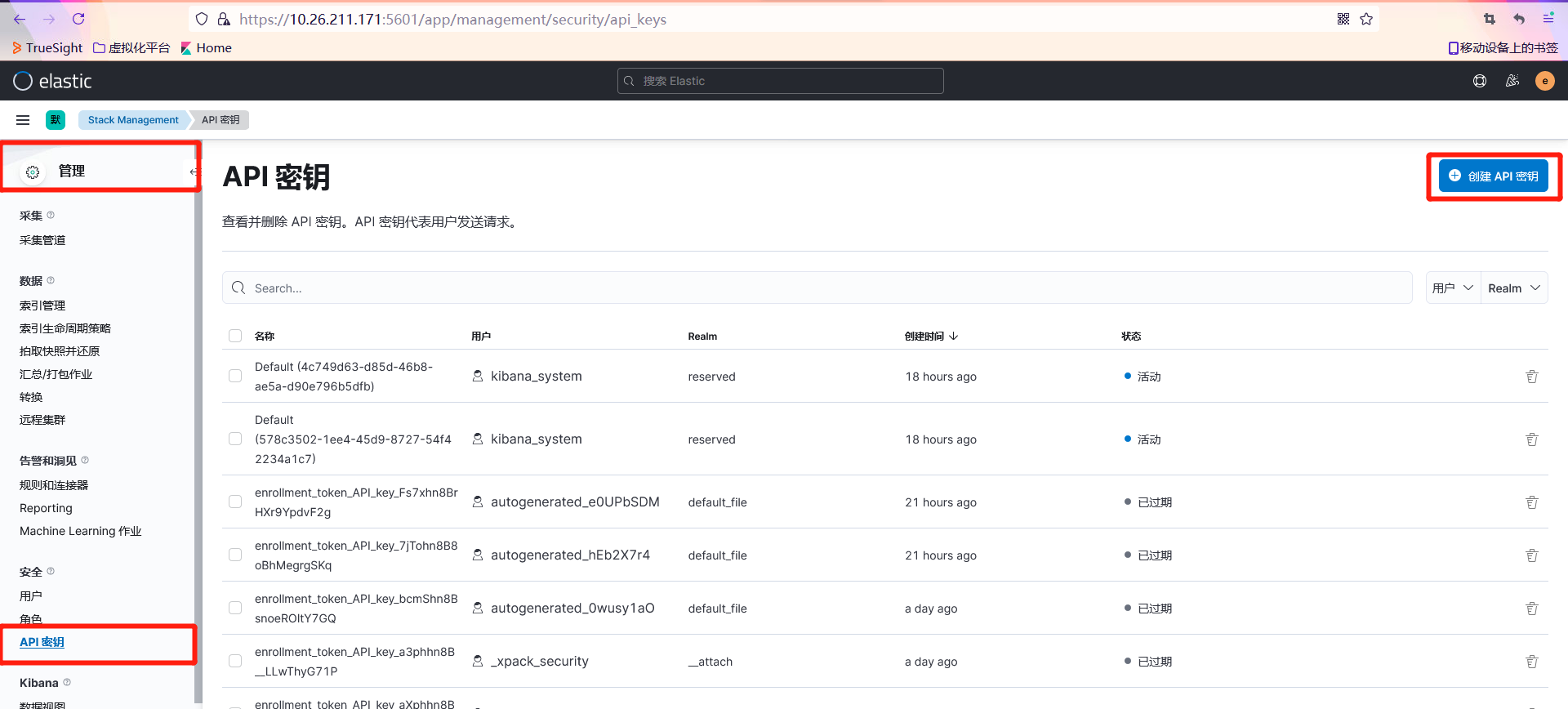
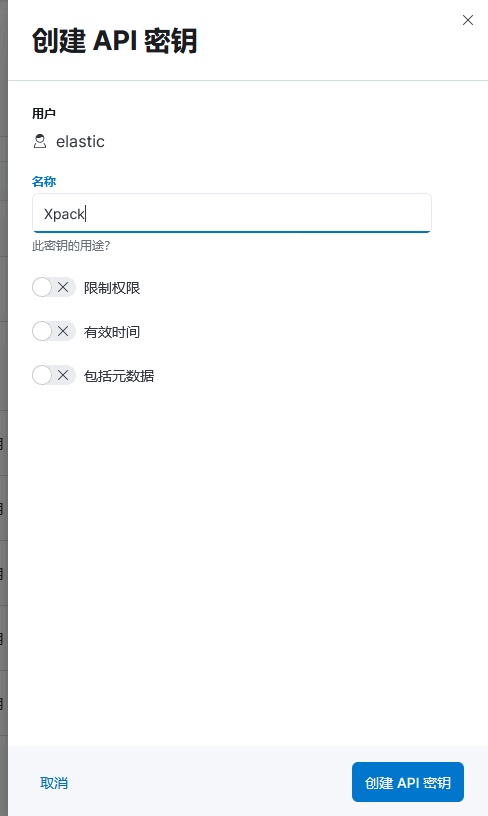
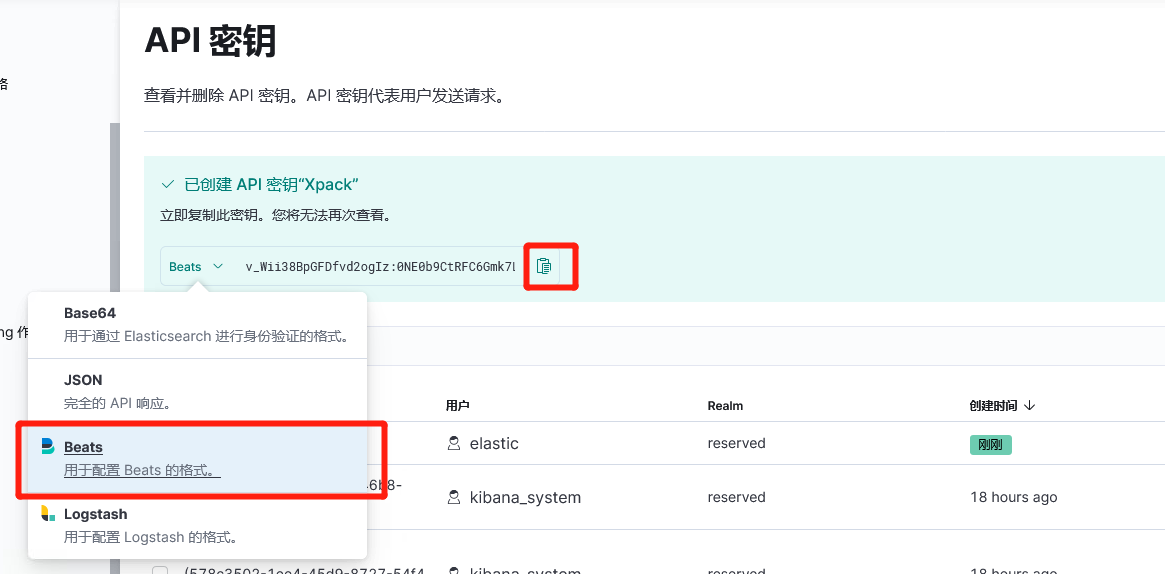
Kibana上生成用于XPACKAPI 密钥

image-20220315105441637

image-20220315113336265

image-20220315113443683

xpack.monitoring.enabled: true
# 集群节点
xpack.monitoring.elasticsearch.hosts: ["https://10.26.211.168:9200", "https://10.26.211.169:9200", "https://10.26.211.170:9200", "https://10.26.211.171:9200"]
xpack.monitoring.elasticsearch.ssl.verification_mode: none
# API密钥
xpack.monitoring.elasticsearch.api_key: "v_Wii38BpGFDfvd2ogIz:0NE0b9CtRFC6Gmk7LQCguA"

最终配置

filebeat.inputs:
- type: filestream
paths:
- /logs/dns/*
fields:
doctype: json_syslog
logindex: dnsqtime
logging.level: info
logging.to_files: true
logging.files:
path: /logs/filebeat
name: filebeat
keepfiles: 7
permissions: 0644
filebeat.config.modules:
path: ${path.config}/modules.d/*.yml
reload.enabled: false
processors:
- drop_fields:
fields: ["input_type","offset"]
output.logstash:
hosts: ["127.0.0.1:5044"]
setup.kibana.host: "https://10.26.211.171:5601"
xpack.monitoring.enabled: true
# 集群节点
xpack.monitoring.elasticsearch.hosts: ["https://10.26.211.168:9200", "https://10.26.211.169:9200", "https://10.26.211.170:9200", "https://10.26.211.171:9200"]
xpack.monitoring.elasticsearch.ssl.verification_mode: none
# API密钥
xpack.monitoring.elasticsearch.api_key: "v_Wii38BpGFDfvd2ogIz:0NE0b9CtRFC6Gmk7LQCguA"
脚本启动#
启、停、状、重#
# vi /etc/init.d/filebeat8
#!/bin/bash
# chkconfig: 2345 10 90
# description: filebeat start stop restart status
# return code:
# 101:running
# 102:stopped
# 103:startup timeout
# 104:shutdown timeout
# filebeat home directory
FILEBEAT_HOME=/soft/filebeat8
status() {
pid=`ps -ef | grep "/soft/filebeat" | grep -v grep | awk '{print $2}'`
if [ -n "$pid" ];then
echo "filebeat is running(pid:$pid)..."
status_code=101
else
echo "filebeat is not running."
status_code=102
fi
}
start() {
status > /dev/null 2>&1
if [ $status_code -eq 101 ];then
echo "filebeat is running(pid:$pid),don't have to start again."
elif [ $status_code -eq 102 ];then
echo "filebeat starting..."
su - elk -c "$FILEBEAT_HOME/filebeat -c $FILEBEAT_HOME/filebeat.yml &" > /dev/null 2>&1
count=0
until [ $status_code -eq 101 ] || [ $count -gt 15 ];do
sleep 3
let count=$count+3
status > /dev/null 2>&1
done
if [ $status_code -eq 101 ];then
echo "filebeat started."
elif [ $count -gt 15 ];then
echo "filebeat failed to start."
status_code=103
fi
fi
}
stop() {
status > /dev/null 2>&1
if [ $status_code -eq 102 ];then
echo "filebeat is not running,don't have to stop again."
elif [ $status_code -eq 101 ];then
echo "filebeat stopping..."
kill -9 $pid
count=0
until [ $status_code -eq 102 ] || [ $count -gt 15 ];do
sleep 3
let count=$count+3
status > /dev/null 2>&1
done
if [ $status_code -eq 102 ];then
echo "filebeat stopped."
elif [ $count -gt 15 ];then
echo "filebeat failed to stop."
status_code=104
fi
fi
}
restart() {
stop
start
}
case $1 in
status)
status
;;
start)
start
;;
stop)
stop
;;
restart)
restart
;;
*)
echo "Usage: $0 {start|stop|status|restart}"
esac

Logstash#

配置#
主配置#
$ vi /soft/logstash8/config/logstash.yml
pipeline.workers: 4
pipeline.batch.size: 3000
pipeline.batch.delay: 500
http.host: "10.26.246.60"
path.logs: /logs/logstash8
xpack.monitoring.enabled: true
xpack.monitoring.elasticsearch.hosts: ["https://10.26.211.168:9200", "https://10.26.211.169:9200", "https://10.26.211.170:9200", "https://10.26.211.171:9200"]
xpack.monitoring.elasticsearch.ssl.verification_mode: none
xpack.monitoring.elasticsearch.api_key: "v_Wii38BpGFDfvd2ogIz:0NE0b9CtRFC6Gmk7LQCguA"
扩展配置#

新建自定义的配置目录

$ mkdir /soft/logstash8/config/myconfig

新增配置文件

  • filter-dnsqtime.conf
  • input-filebeat.conf
  • output-es.conf

input-filebeat.conf

input {
beats {
port => 5044
host => "127.0.0.1"
}
}

filter-dnsqtime.conf

filter {
if [fields][logindex] == "dnsqtime"{
json {
source => "message"
remove_field => ["message","beat.name","beat.version","offset"]
}
date {
match => [ "timegenerated" , "ISO8601" ]
}
if "root" in [app-name] {
if "5" in [syslogseverity]{
grok {
match => {"log_info" => "\{\s+%{IPV4:sourceip}\.%{DATA:sourceport} > %{IPV4:targetip}\.%{DATA:targetport}: \[%{DATA}\]+\s+%{NUMBER:traid}%{DATA}\s%{WORD:qtype}\?\s%{DATA:visitsite}\.\s+%{DATA}\}"}
}
if [sourceport] == "53" {
mutate{
add_tag => [ "taskTerminated" ]
add_field => {"task_id" => "%{traid}_%{targetip}_%{targetport}"
"dnsserver" => "%{sourceip}"
"queryclient" => "%{targetip}" }
}} else if [targetport] == "53" {
mutate{
add_tag => [ "taskStarted" ]
add_field => {"task_id" => "%{traid}_%{sourceip}_%{sourceport}"
"dnsserver" => "%{targetip}"
"queryclient" => "%{sourceip}" }
}} else {
mutate{
add_tag => [ "MissMatched" ]
}}
elapsed {
start_tag => "taskStarted"
end_tag => "taskTerminated"
unique_id_field => "task_id"
}
}
}
}
}

output-es.conf

创建用于Logstash输出到ElasticsearchAPI密钥

API密钥wfU5jH8BpGFDfvd2oQKb:WRy5BmpLQD-FexsyjzGQXA

output {
if [fileset][module] == "system" or [fileset][module] =="apache2"{
elasticsearch {
api_key => "wfU5jH8BpGFDfvd2oQKb:WRy5BmpLQD-FexsyjzGQXA"
ssl => true
ssl_certificate_verification => false
hosts => ["10.26.211.168:9200","10.26.211.169:9200","10.26.211.170:9200","10.26.211.171:9200"]
#index => "%{[@metadata][beat]}-%{[@metadata][version]}-%{+YYYY.MM.dd}"
index => "filebeat-%{[@metadata][version]}-%{+YYYY.MM.dd}"
}
}
else {
elasticsearch {
api_key => "wfU5jH8BpGFDfvd2oQKb:WRy5BmpLQD-FexsyjzGQXA"
ssl => true
ssl_certificate_verification => false
hosts => ["10.26.211.168:9200","10.26.211.169:9200","10.26.211.170:9200","10.26.211.171:9200"]
#index => "filebeat-apache-%{+YYYYMM}"
index => "%{[fields][logindex]}-%{[fields][doctype]}-%{+YYYYMMdd}"
}
}
}
脚本启动#
# vi /etc/init.d/logstash8
#!/bin/bash
# chkconfig: 2345 10 90
# description: logstash start stop restart status
# return code:
# 101:running
# 102:stopped
# 103:startup timeout
# 104:shutdown timeout
# logstash home directory
LOGSTASH_HOME=/soft/logstash8
status() {
pid=`ps -ef | grep java | grep $LOGSTASH_HOME | grep -v grep | awk '{print $2}'`
if [ -n "$pid" ];then
echo "logstash is running(pid:$pid)..."
status_code=101
else
echo "logstash is not running."
status_code=102
fi
}
start() {
status > /dev/null 2>&1
if [ $status_code -eq 101 ];then
echo "logstash is running(pid:$pid),don't have to start again."
elif [ $status_code -eq 102 ];then
echo "logstash starting..."
su - elk -c "$LOGSTASH_HOME/bin/logstash -f $LOGSTASH_HOME/config/myconfig &" > /dev/null 2>&1
count=0
until [ $status_code -eq 101 ] || [ $count -gt 15 ];do
sleep 3
let count=$count+3
status > /dev/null 2>&1
done
if [ $status_code -eq 101 ];then
echo "logstash started."
elif [ $count -gt 15 ];then
echo "logstash failed to start."
status_code=103
fi
fi
}
stop() {
status > /dev/null 2>&1
if [ $status_code -eq 102 ];then
echo "logstash is not running,don't have to stop again."
elif [ $status_code -eq 101 ];then
echo "logstash stopping..."
kill -9 $pid
count=0
until [ $status_code -eq 102 ] || [ $count -gt 15 ];do
sleep 3
let count=$count+3
status > /dev/null 2>&1
done
if [ $status_code -eq 102 ];then
echo "logstash stopped."
elif [ $count -gt 15 ];then
echo "logstash failed to stop."
status_code=104
fi
fi
}
restart() {
stop
start
}
case $1 in
status)
status
;;
start)
start
;;
stop)
stop
;;
restart)
restart
;;
*)
echo "Usage: $0 {start|stop|status|restart}"
esac
启、停、状、重#
# service logstash8 {start|stop|status|restart}

数据缓存处理#

两台服务器都需要操作且相同

上传软件包#

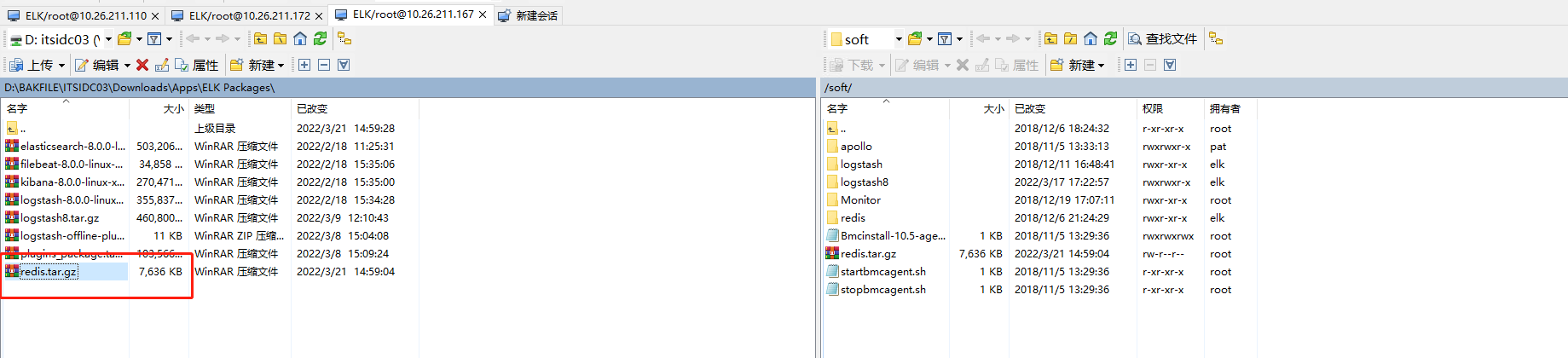
部署logstashredis

logstash-8.0.0-linux-x86_64.tar.gz -> /soft

  • 10.26.211.166
  • 10.26.211.167

image-20220317171757267

解压#

使用elk用户操作

$ tar xvf logstash-8.0.0-linux-x86_64.tar.gz

重命名#

$ mv logstash-8.0.0 logstash8

配置#

配置目录:/soft/logstash8/config

主配置#

logstash.yml#

10.26.211.166

pipeline.workers: 4
pipeline.batch.size: 3000
pipeline.batch.delay: 500
http.host: "10.26.211.166"
path.logs: /logs/logstash8
xpack.monitoring.enabled: true
xpack.monitoring.elasticsearch.hosts: ["https://10.26.211.168:9200", "https://10.26.211.169:9200", "https://10.26.211.170:9200", "https://10.26.211.171:9200"]
xpack.monitoring.elasticsearch.ssl.verification_mode: none
xpack.monitoring.elasticsearch.api_key: "v_Wii38BpGFDfvd2ogIz:0NE0b9CtRFC6Gmk7LQCguA"

10.26.211.167

pipeline.workers: 4
pipeline.batch.size: 3000
pipeline.batch.delay: 500
http.host: "10.26.211.167"
path.logs: /logs/logstash8
xpack.monitoring.enabled: true
xpack.monitoring.elasticsearch.hosts: ["https://10.26.211.168:9200", "https://10.26.211.169:9200", "https://10.26.211.170:9200", "https://10.26.211.171:9200"]
xpack.monitoring.elasticsearch.ssl.verification_mode: none
xpack.monitoring.elasticsearch.api_key: "v_Wii38BpGFDfvd2ogIz:0NE0b9CtRFC6Gmk7LQCguA"

扩展配置#

新建配置目录

$ mkdir /soft/logstash8/config/myconfig
新增配置文件#
  • filter-dnsserver.conf

    input {
    redis {
    host => "10.26.211.166"
    password => "Red_elk1"
    data_type => "list"
    port => 6379
    key => "dnsserver"
    batch_count => 2000
    threads => 4
    }
    redis {
    host => "10.26.211.167"
    password => "Red_elk1"
    data_type => "list"
    port => 6379
    key => "dnsserver"
    batch_count => 2000
    threads => 4
    }
    }
    filter {
    if [fields][logindex] == "dnsserver"{
    json {
    source => "message"
    remove_field => ["message","beat.name","beat.version","offset"]
    }
    if "named" in [app-name] {
    if "6" in [syslogseverity]{
    grok {
    match => {"log_info" => "{\s+client %{IPV4:sourceip}#%{NUMBER:reqport} \(%{DATA:reqaddress}\): view %{WORD:viewtype}: query: (%{DATA:reqhost}(?<domain>([a-zA-Z0-9_-]{1,62})(\.(cn|com|net|dpca|tv|org|gov|info|la|cc|co)?(\.cn|jp|dpca)?))?) IN %{DATA:qtype} \(%{DATA:desip}\)}" }
    }
    }
    if "5" in [syslogseverity]{
    grok {
    match => {"log_info" => "{%{DATA:str1} %{IPV4:targetip}#%{NUMBER:port} %{DATA:action1}: %{DATA:detail} -- %{GREEDYDATA:reason}}"}
    }
    }
    }
    }
    }
  • filter-olft.conf

    input {
    redis {
    host => "10.26.211.166"
    password => "Red_elk1"
    data_type => "list"
    port => 6379
    key => "olft"
    batch_count => 2000
    threads => 4
    }
    redis {
    host => "10.26.211.167"
    password => "Red_elk1"
    data_type => "list"
    port => 6379
    key => "olft"
    batch_count => 2000
    threads => 4
    }
    }
    filter {
    if [fields][logindex] == "olft"{
    if [fields][doctype] == "olft_summary"
    {
    json {
    source => "message"
    remove_field => ["message"]
    }
    }
    if [fields][doctype] == "olft_detail"
    {
    json {
    source => "message"
    }
    date {
    match => [ "endTime" , "yyyyMMddHHmmss" ]
    add_field => {"hostname" => "%{[beat][hostname]}"}
    remove_field => ["beat","message"]
    }
    geoip {
    source => "ip"
    target => "geoip"
    fields => ["city_name","country_name","","location"]
    }
    mutate {
    convert => ["[fileSize]","integer"]
    }
    }
    }
    }
  • input-filebeat.conf

    input {
    redis {
    host => "10.26.211.166"
    password => "Red_elk1"
    data_type => "list"
    port => 6379
    key => "filebeat"
    batch_count => 2000
    threads => 4
    }
    redis {
    host => "10.26.211.167"
    password => "Red_elk1"
    data_type => "list"
    port => 6379
    key => "filebeat"
    batch_count => 2000
    threads => 4
    }
    }
  • input-oslog.conf

    input {
    redis {
    host => "10.26.211.166"
    password => "Red_elk1"
    data_type => "list"
    port => 6379
    key => "oslog"
    batch_count => 2000
    threads => 4
    }
    redis {
    host => "10.26.211.167"
    password => "Red_elk1"
    data_type => "list"
    port => 6379
    key => "oslog"
    batch_count => 2000
    threads => 4
    }
    }
  • input-pvnserver.conf

    input {
    redis {
    host => "10.26.211.166"
    password => "Red_elk1"
    data_type => "list"
    port => 6379
    key => "pvnserver"
    batch_count => 2000
    threads => 4
    }
    redis {
    host => "10.26.211.167"
    password => "Red_elk1"
    data_type => "list"
    port => 6379
    key => "pvnserver"
    batch_count => 2000
    threads => 4
    }
    }
  • output-es.conf

    创建一个用于数据输出的API密钥

    i_4mm38B45nhiZLu0Rlm:pst0SURmS9eTWQDjEMD3OQ

    output {
    if [fileset][module] == "system" or [fileset][module] =="apache2"{
    elasticsearch {
    api_key => "i_4mm38B45nhiZLu0Rlm:pst0SURmS9eTWQDjEMD3OQ"
    ssl => true
    ssl_certificate_verification => false
    hosts => ["10.26.211.168:9200","10.26.211.169:9200","10.26.211.170:9200","10.26.211.171:9200"]
    manage_template => false
    #index => "%{[@metadata][beat]}-%{[@metadata][version]}-%{+YYYY.MM.dd}"
    index => "syslog-%{[@metadata][version]}-%{+YYYY.MM.dd}"
    }
    }
    else if [fields][logindex] == "olft" {
    elasticsearch {
    api_key => "i_4mm38B45nhiZLu0Rlm:pst0SURmS9eTWQDjEMD3OQ"
    ssl => true
    ssl_certificate_verification => false
    hosts => ["10.26.211.168:9200","10.26.211.169:9200","10.26.211.170:9200","10.26.211.171:9200"]
    index => "logstash-%{[fields][logindex]}-%{[fields][doctype]}-%{+YYYYMM}"
    }
    }
    else {
    elasticsearch {
    api_key => "wfU5jH8BpGFDfvd2oQKb:WRy5BmpLQD-FexsyjzGQXA"
    ssl => true
    ssl_certificate_verification => false
    hosts => ["10.26.211.168:9200","10.26.211.169:9200","10.26.211.170:9200","10.26.211.171:9200"]
    index => "logstash-%{[fields][logindex]}-%{[fields][doctype]}-%{+YYYYMMdd}"
    }
    }
    }

脚本管理#

# vi /etc/init.d/logstash8
#!/bin/bash
# chkconfig: 2345 10 90
# description: logstash start stop restart status
# return code:
# 101:running
# 102:stopped
# 103:startup timeout
# 104:shutdown timeout
# logstash home directory
LOGSTASH_HOME=/soft/logstash8
status() {
pid=`ps -ef | grep java | grep $LOGSTASH_HOME | grep -v grep | awk '{print $2}'`
if [ -n "$pid" ];then
echo "logstash is running(pid:$pid)..."
status_code=101
else
echo "logstash is not running."
status_code=102
fi
}
start() {
status > /dev/null 2>&1
if [ $status_code -eq 101 ];then
echo "logstash is running(pid:$pid),don't have to start again."
elif [ $status_code -eq 102 ];then
echo "logstash starting..."
su - elk -c "$LOGSTASH_HOME/bin/logstash -f $LOGSTASH_HOME/config/myconfig &" > /dev/null 2>&1
count=0
until [ $status_code -eq 101 ] || [ $count -gt 15 ];do
sleep 3
let count=$count+3
status > /dev/null 2>&1
done
if [ $status_code -eq 101 ];then
echo "logstash started."
elif [ $count -gt 15 ];then
echo "logstash failed to start."
status_code=103
fi
fi
}
stop() {
status > /dev/null 2>&1
if [ $status_code -eq 102 ];then
echo "logstash is not running,don't have to stop again."
elif [ $status_code -eq 101 ];then
echo "logstash stopping..."
kill -9 $pid
count=0
until [ $status_code -eq 102 ] || [ $count -gt 15 ];do
sleep 3
let count=$count+3
status > /dev/null 2>&1
done
if [ $status_code -eq 102 ];then
echo "logstash stopped."
elif [ $count -gt 15 ];then
echo "logstash failed to stop."
status_code=104
fi
fi
}
restart() {
stop
start
}
case $1 in
status)
status
;;
start)
startnnmbb
;;
stop)
stop
;;
restart)
restart
;;
*)
echo "Usage: $0 {start|stop|status|restart}"
esac

启、停、状、重#

# service logstash8 {start|stop|status|restart}

Redis部署#

  • 10.26.211.166
  • 10.26.211.167

上传并解压缩#

image-20220321151234362

配置脚本管理#

# vi /etc/init.d/redis
#!/bin/sh
# chkconfig: 2345 90 10
# description: Redis is a persistent key-value database
#
# Simple Redis init.d script conceived to work on Linux systems
# as it does use of the /proc filesystem.
REDISPORT=6379
EXEC=/soft/redis/bin/redis-server
CLIEXEC=/soft/redis/bin/redis-cli
PIDFILE=/soft/redis/run/redis_${REDISPORT}.pid
CONF="/soft/redis/conf/redis.conf"
HOST=`hostname`
case "$1" in
start)
if [ -f $PIDFILE ]
then
echo "$PIDFILE exists, process is already running or crashed"
else
echo "Starting Redis server..."
su - elk -c "$EXEC $CONF &"
fi
;;
stop)
if [ ! -f $PIDFILE ]
then
echo "$PIDFILE does not exist, process is not running"
else
PID=$(cat $PIDFILE)
echo "Stopping ..."
su - elk -c "$CLIEXEC -h $HOST -a "Red_elk1" shutdown"
while [ -x /proc/${PID} ]
do
echo "Waiting for Redis to shutdown ..."
sleep 1
done
echo "Redis stopped"
fi
;;
*)
echo "Please use start or stop as first argument"
;;
esac

接受并处理syslog日志#

  • 10.26.211.110
  • 10.26.211.172

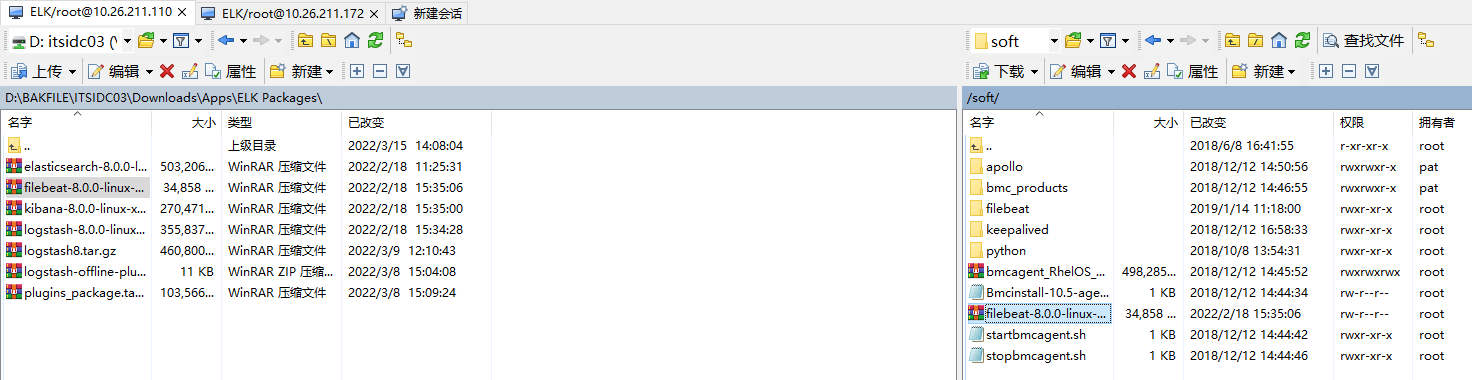
上传软件#

image-20220321114101823

解压缩#

$ tar xvf filebeat-8.0.0-linux-x86_64.tar.gz

重命名#

$ mv filebeat-8.0.0-linux-x86_64 filebeat8

配置#

$ vi /soft/filebeat8/filebeat.yml
filebeat.inputs:
- type: filestream
paths:
- /logs/dns/*
fields:
doctype: jsonlog
logindex: dnsserver
- type: filestream
paths:
- /logs/elksyslog/*
logging.level: info
logging.to_files: true
logging.files:
path: /logs/filebeat8
name: filebeat
keepfiles: 7
permissions: 0644
filebeat.config.modules:
path: ${path.config}/modules.d/*.yml
reload.enabled: false
processors:
- drop_fields:
fields: ["input_type","offset"]
output.redis:
hosts: ["10.26.211.166:6379","10.26.211.167:6379"]
key: "%{[fields][logindex]:filebeat}"
password : "Red_elk1"
db: 0
timeout: 5
loadbalance: true
backoff.init: 10
backoff.max: 600d
setup.kibana.host: "https://10.26.211.171:5601"
xpack.monitoring.enabled: true
# 集群节点
xpack.monitoring.elasticsearch.hosts: ["https://10.26.211.168:9200", "https://10.26.211.169:9200", "https://10.26.211.170:9200", "https://10.26.211.171:9200"]
xpack.monitoring.elasticsearch.ssl.verification_mode: none
# API密钥
xpack.monitoring.elasticsearch.api_key: "v_Wii38BpGFDfvd2ogIz:0NE0b9CtRFC6Gmk7LQCguA"

FileBeat 客户端部署#

支持收集ApacheNginx访问日志并在Kibana中创建可视化图表

使用pat用户操作

上传软件包至/soft#
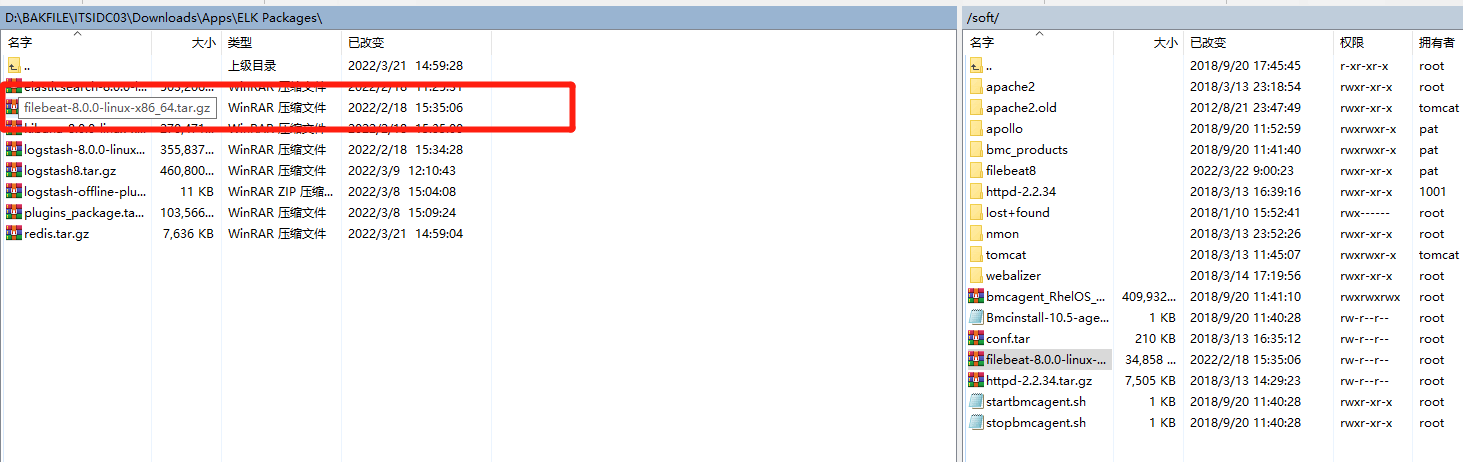
image-20220323115505423.png

解压缩#

$ tar xvf filebeat-8.0.0-linux-x86_64.tar.gz

重命名#

$ mv filebeat-8.0.0-linux-x86_64 filebeat8

配置#

$ vi /soft/filebeat8/filebeat.yml
filebeat.config.modules:
path: ${path.config}/modules.d/*.yml
reload.enabled: false
setup.template.settings:
index.number_of_shards: 1
setup.kibana:
host: "https://10.26.211.171:5601"
ssl.verification_mode: none
output.elasticsearch:
hosts: ["10.26.211.168:9200", "10.26.211.169:9200", "10.26.211.170:9200", "10.26.211.171:9200"]
protocol: "https"
api_key: "YOW2q38B3CilsEnwxXVb:E7tcYnjTQweI9ZP9UnflSA"
ssl:
enabled: true
ca_trusted_fingerprint: "1691e69059dcb6deffbdc5a81bccd614fee75e6acdca5c23f86c0dbb29b9e565"
初始化面板和管道至Kibana上#
$ /soft/filebeat8/filebeat setup
配置模块#

模块目录:{filebeat_home}/modules.d

默认所有模块为禁用状态

Apache#

启用该模块

$ ./filebeat modules enable apache

配置

$ vi /soft/filebeat8/modules.d/apache.yml

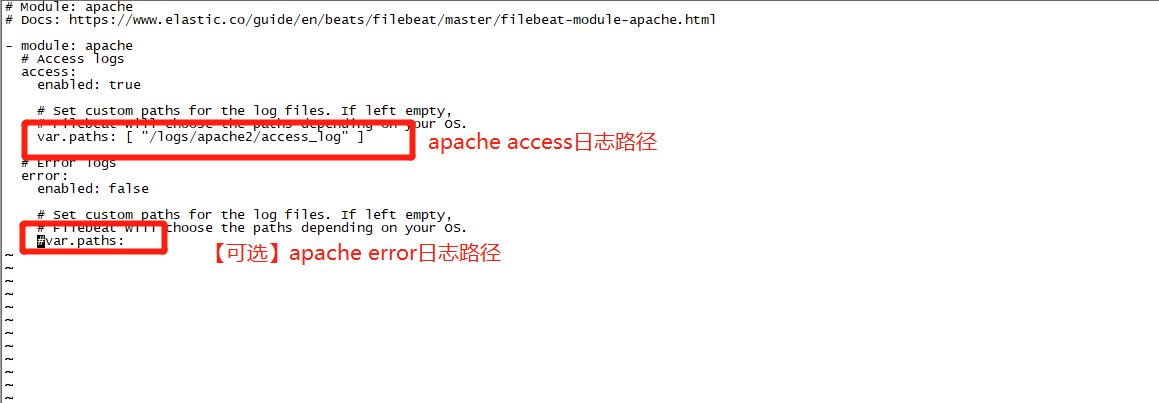
image-20220324091920399.png

  • 确保pat用户对 apache的access日志文件有访问权限,如果没有请使用root执行

    # chmod +r {access文件路径}
其他模块#

参考

管理脚本#
# vi /etc/init.d/filebeat8
#!/bin/bash
# chkconfig: 2345 10 90
# description: filebeat start stop restart status
# return code:
# 101:running
# 102:stopped
# 103:startup timeout
# 104:shutdown timeout
# filebeat home directory
FILEBEAT_HOME=/soft/filebeat8
status() {
pid=`ps -ef | grep "/soft/filebeat" | grep -v grep | awk '{print $2}'`
if [ -n "$pid" ];then
echo "filebeat is running(pid:$pid)..."
status_code=101
else
echo "filebeat is not running."
status_code=102
fi
}
start() {
status > /dev/null 2>&1
if [ $status_code -eq 101 ];then
echo "filebeat is running(pid:$pid),don't have to start again."
elif [ $status_code -eq 102 ];then
echo "filebeat starting..."
su - elk -c "$FILEBEAT_HOME/filebeat -c $FILEBEAT_HOME/filebeat.yml &" > /dev/null 2>&1
count=0
until [ $status_code -eq 101 ] || [ $count -gt 15 ];do
sleep 3
let count=$count+3
status > /dev/null 2>&1
done
if [ $status_code -eq 101 ];then
echo "filebeat started."
elif [ $count -gt 15 ];then
echo "filebeat failed to start."
status_code=103
fi
fi
}
stop() {
status > /dev/null 2>&1
if [ $status_code -eq 102 ];then
echo "filebeat is not running,don't have to stop again."
elif [ $status_code -eq 101 ];then
echo "filebeat stopping..."
kill -9 $pid
count=0
until [ $status_code -eq 102 ] || [ $count -gt 15 ];do
sleep 3
let count=$count+3
status > /dev/null 2>&1
done
if [ $status_code -eq 102 ];then
echo "filebeat stopped."
elif [ $count -gt 15 ];then
echo "filebeat failed to stop."
status_code=104
fi
fi
}
restart() {
stop
start
}
case $1 in
status)
status
;;
start)
start
;;
stop)
stop
;;
restart)
restart
;;
*)
echo "Usage: $0 {start|stop|status|restart}"
esac

启、停、状、重#

# service filebeat8 {start|stop|status|restart}

Cisco日志收集#

  • 10.26.211.110

上传Filebeat并解压缩至/soft目录,命名为filebeat_cisco

配置#

[elk@u1aelkxp01 filebeat_cisco]$ vi filebeat.yml
filebeat.config.modules:
path: ${path.config}/modules.d/*.yml
reload.enabled: false
setup.template.settings:
index.number_of_shards: 1
setup.kibana:
host: "https://10.26.211.171:5601"
ssl.verification_mode: none
output.elasticsearch:
hosts: ["10.26.211.168:9200", "10.26.211.169:9200", "10.26.211.170:9200", "10.26.211.171:9200"]
protocol: "https"
api_key: "YOW2q38B3CilsEnwxXVb:E7tcYnjTQweI9ZP9UnflSA"
ssl:
enabled: true
ca_trusted_fingerprint: "1691e69059dcb6deffbdc5a81bccd614fee75e6acdca5c23f86c0dbb29b9e565"

启用cisco模块#

[elk@u1aelkxp01 filebeat_cisco]$ ./filebeat modules enable cisco
配置#
[elk@u1aelkxp01 filebeat_cisco]$ vi modules.d/cisco.yml
· · ·
ios:
enabled: true
# Set which input to use between syslog (default) or file.
var.input: syslog
# The interface to listen to syslog traffic. Defaults to
# localhost. Set to 0.0.0.0 to bind to all available interfaces.
var.syslog_host: 0.0.0.0
# The port to listen on for syslog traffic. Defaults to 9002.
var.syslog_port: 9002
# Set which protocol to use between udp (default) or tcp.
var.syslog_protocol: udp
# Set custom paths for the log files when using file input. If left empty,
# Filebeat will choose the paths depending on your OS.
#var.paths:
· · ·
配置管理脚本#
[root@u1aelkxp01 init.d]# vi /etc/init.d/filebeat_cisco
# description: filebeat start stop restart status
# return code:
# 101:running
# 102:stopped
# 103:startup timeout
# 104:shutdown timeout
# filebeat home directory
FILEBEAT_HOME=/soft/filebeat_cisco
status() {
pid=`ps -ef | grep "/soft/filebeat_cisco" | grep -v grep | awk '{print $2}'`
if [ -n "$pid" ];then
echo "filebeat is running(pid:$pid)..."
status_code=101
else
echo "filebeat is not running."
status_code=102
fi
}
start() {
status > /dev/null 2>&1
if [ $status_code -eq 101 ];then
echo "filebeat is running(pid:$pid),don't have to start again."
elif [ $status_code -eq 102 ];then
echo "filebeat starting..."
su - elk -c "$FILEBEAT_HOME/filebeat -c $FILEBEAT_HOME/filebeat.yml &" > /dev/null 2>&1
count=0
until [ $status_code -eq 101 ] || [ $count -gt 15 ];do
sleep 3
let count=$count+3
status > /dev/null 2>&1
done
if [ $status_code -eq 101 ];then
echo "filebeat started."
elif [ $count -gt 15 ];then
echo "filebeat failed to start."
status_code=103
fi
fi
}
stop() {
status > /dev/null 2>&1
if [ $status_code -eq 102 ];then
echo "filebeat is not running,don't have to stop again."
elif [ $status_code -eq 101 ];then
echo "filebeat stopping..."
kill -9 $pid
count=0
until [ $status_code -eq 102 ] || [ $count -gt 15 ];do
sleep 3
let count=$count+3
status > /dev/null 2>&1
done
if [ $status_code -eq 102 ];then
echo "filebeat stopped."
elif [ $count -gt 15 ];then
echo "filebeat failed to stop."
status_code=104
fi
fi
}
restart() {
stop
start
}
case $1 in
status)
status
;;
start)
start
;;
stop)
stop
;;
restart)
restart
;;
*)
echo "Usage: $0 {start|stop|status|restart}"
esac